2007年10月18日星期四

采购设置 ——> 1采购选项 ——> 1.1 Control面板

最近比较闲,开始学习采购设置。

采购设置 ——> 采购选项 ——> Control面板


a. Price Tolerance

通过Requisition Summary查询,请购行单价.9915。


如果采购选项中采购价格百分比做如下的设定。


通过Auto Create将这个请购单创建到标准订单的时候,将价格更改为15(大于20% * .9915,其中.9915为上述请购行的单价),保存,点击Approve按钮提交审批,可以弹出审批界面,证明系统没有因为单价超过容差百分比而限制订单的审批。


如果采购选项中采购价格百分比做如下的设定。


那么将会再通过Approve按钮去访问提交审批界面的时候,将会出现错误提示。
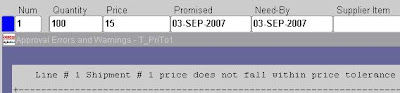


结论:Price Tolerance Percentage和Enforce Price Tolerance Percentage要结合使用。只有Enable了Enforce Price Tolerance Percentage的时候,在Price Tolerance Percentage设定的值才起作用。

如果将设定Price Tolerance Amount。


针对同样的采购订单,如果单价为1.1(累计Tolerance的金额为(1.1-.9915)*100 > 10 ),点击Approve按钮,出现如下错误。


结论:同Price Tolerance Percentage,只是一个侧重采购金额,一个侧重价格百分比。

b. Receipt Close Point

设定这个值,决定在什么时候对订单发运行进行Close For Receiving。一共有三个选型值,对应于采购接收的三个步骤——Receipt,Accept,Delivered。
下面测试这个值的设置,对发运行自动关闭的影响。

在采购选项中设置。


通常和Receipt Close结合使用(这个值在采购选项Default面板设置)。


创建采购订单,检查其发运行,其Closure Status为Open。


采购选项的值被带入发运行。


对审批的采购发运行做Receipt,发运行本来的数量为1000。


这里我们接收(1-10%)*1000 = 900数量,保存。


再检查发运行状态,已经为Closed For Receiving。


结论:这个选项控制在采购接收的什么步骤进行订单的自动关闭,通常需要和Receipt Close选项结合使用。从正常的业务逻辑来讲,设置为Delivery比较合理。

c. Cancel Requisition

这个选项只应用于通过Auto Create创建的订单的请购单。有三个选项Optionally,Always,Never。

Path:Purchasing Option(Menu)->Control(Tab)
设置其值为Optionally。


订单T_ClosePoint1通过Auto Create通过请购单创建而来。
Path:Purchase Order Summary(Window)-> Control (Menu)


从弹出的Control窗口中,有取消请购的选项。


如果设置为 Always


检查Control窗口,Cancel Requisition默认选择,且不让更改。


结论:用户控制在取消采购单的时候,是否取消采购单对应的请购单。
问题:如果取消了请购单,而请购单从MRP创建,对计划的影响(To Do)。


d. Notify If Blanket PO Exists


创建请购单的时候,如果对应Item已经存在BPA,给出提示。


e. Allow Item Description Update

是否在请购/采购行上更新Item的描述。


Item层的这个属性会覆盖采购选项的属性,所以必须在Item层上设置之后再测试。


请购行上的描述字段变成可编辑状态了。


结论:采购选项关于Item描述的更新设置通常没有什么用,一般在Item层属性都会覆盖采购选项的设置。在Item层应该设计为下拉框,有三个选项(Yes,No,Null)。其中Null表示在Item层不设置这个属性,从而不会覆盖采购选项层的设置。

如果Enable这个选项,对新创建的Item,Item层的可更新描述的选项默认也是Enable的。


f. Enforce Vendor Hold


同时在Supplier的定义的Purchasing也设置Purchase Order Hold。


针对这个Supplier创建采购订单,然后点击提交,系统将会出现如下的提示错误。

2007年10月15日星期一

远程重新启动服务器

上周通过远程桌面控制的时候,关闭其中一个窗口,没有响应,我就强行结束任务,没想到系统pending住,桌面蓝屏,远程桌面不能控制,VNC也不能登录了。看到web server等其他服务在正常运行,便回家过周末去了:)

本来想找系统管理员到机器旁边去看一下,不过看到是自己犯的错误,还是自己先想办法吧。网络真好,通过如下两个命令搞定了:

net use \\192.168.0.3\admin$ adminpasswd /user:administrator
shutdown -r -m \\192.168.0.3 -t 30 -f

2007年10月10日星期三

几个itpub关于采购审批层次的帖子

Q: 问个po审批层次的问题
在po中定义了审批层次,我想问一下,在采购订单提交审批的时候,按照什么样的规则提交给不同层次的审批者?比如:一级a,二级b,三级c,b有5000元的最高审批权限,那么c做的采购订单什么情况下会由a来审批呢?超出5000元么?是由b转给a ,还是直接发送到了a????

A: 没有试验,不知道如下是否满足你的需求
1)首先需要设定两个审批组一个审判GroupB审批的金额1~5000,另外一个组Group审批金额为5001~99999999999999999。
2)审批组分配。将b的职位分配到GroupB,将a的职位分配到GroupA。
3)设置文档类型的Foward Method的属性。如果超过5000,直接到A,那么将Forward Method属性值设为Direct。如果需要B转交,那么将Forward Method属性值设为Hiberarchy

URL:http://www.itpub.net/649786.html


Q: 怎样指定审批层次的默认审批人
因为公司同时使用了HR和PO模块。在HR模块中处于同一个position(PA)的有多个人(MA,MB,MC等),这个position在采购的审批层次中,而这个position的几个人中,只有一个(MB)负责采购审批业务。 问题在于:用户提交单据的时候,发现审批路径上的人默认的时MA,而不是MB,这个用户带来很大的困惑。 请问是否有什么可以预制文件或者设置的地方,将MB设定为默认的审批人呢?

A:OSS给出回复:
1) 如果是11.5.9版本,没有这个功能,以字母的ascii码顺序默认审批人。
参考Metalink:Note 106596.1
Another method that must be considered is one where the application choosesthe forward-to person when multiple employees are tied to one position. Theapplication will select the forward-to person based on alphabetical nameorder. Here is an example to better clarify how the system chooses the nextapprover name when multiple approvers are assigned to one position:Position: ClerkEmployees Assigned: ManyReports To: Vice President, MaterialsPostion: Vice President, MaterialsEmployees Assigned: Dough, John S.Smith, Bob A.In this example, if a clerk chooses the Approve button without entering aforward-to person, and the next position above the clerk is theVice President of Materials, the document would be routed to John Dough.John Dough is selected because the system will choose the employee assignedto the position in alphabetical order, and since Dough comes before Smith,John Dough is selected. Therefore, unless the clerk selects a specificperson to forward the document to, the document will always be routed to thefirst person alphabetically assigned to the position.
2) 如果是11.5.10版本,安装Oracle Approvals Management (AME) ,可以设定默认审批人。
参考Metalink:Note 229663.1
Oracle Approvals Management (AME) is a web–based application which is integrated with Oracle Workflow and which enables you to define business rules to control your approvals processes. With AME, you use the following components to define your approvals processes. They are associated with a transaction type for a particular application.• Attribute – this is a business variable, for example, a salary amount, user ID, or workflow process name.• Condition – a condition compares an attribute value with a set of allowed attribute values. For example, a condition could look at a salary amount. If the salary is greater than a specified value, a particular approver list is created.• Approval type and approval specifications – these components define the type of approver list that is generated. For example, to generate a supervisor–based approver list with 5 levels, you use the ’supervisory level’ approval type with the ’requires approval up to the first 5 approvers’ approval specification.• Rules – a rule links the other components together by associating one or more conditions with the approval type and approval rule

http://www.itpub.net/616596,2.html

2007年9月2日星期日

访问form界面,IE窗口退出

今天突然发现访问不了ERP,一旦需要打开Form界面的时候,IE窗口自动退出。同时桌面有一个日志文件,部分内容如下。

An unexpected exception has been detected in native code outside the VM.Unexpected Signal : EXCEPTION_ACCESS_VIOLATION occurred at PC=0x77ea364eFunction name=NdrRpcSsDefaultAllocateLibrary=C:\WINDOWS\system32\RPCRT4.dll

通过google查询,发现部分关于vista中怎样使用Jinitiator是用高版本的jvm替换对应的jvm。发现并不能解决问题,卸载掉部分jre的版本也没能够解决问题。最后还是在metalink上找到了解决方法,是msn的插件的问题,想起来前两天还错点了msn的按钮,应该是这个原因吧:

Solution
-- To implement the solution, please execute the following steps::Suggest to check if this plug in is installed and enabled. If this is the case disable it using the following actions:1.Tools - Manage Add-ons - Enable or Disable Add-ons
2. In Show option - "Add-ons that have been used by Internet Explorer"Select from the list and check for Name "Windows Live ...."
e.g "Windows Live Messenger", "Windows Live Sing-in Helper" etc.
3. Select "Disable" option4. Close all the Internet explorer browser sessions. Restart the client machine.
5. Retest the issue.

参考:Note:435562.1

2007年8月25日星期六

2000 servers终于可以通过网络访问了

自从在HP dv9207us机器被我从Vista降级安装windows 2000 server之后,问题一直不断。先是硬件驱动器的问题,后来是无限局域网内其他机器不能访问它的问题。所以,又作服务器有做客户端,够辛苦的。网络上有很多关于这种能够Ping通,但是不能通过网上邻居访问的解决方法,主要有:
1、是否添加了“文件和打印共享”
2、组策略中是否禁止了你用来访问的用户?

发现都不是这些问题所在。无意在组策略的安全设置中,发现“IP安全策略,在本地机器中-〉安全服务器”是选中的,将其去掉就OK。

现在终于可以从其他两台机器来访问这台服务器了。

2007年8月17日星期五

数据库导入导出乱码问题


项目数据需要清理,DBA将数据按照用户导出发过了。导入数据的时候,发现数据库中文全部变成问号。上网找了一下资料,发现原来是数据库字符集不兼容。导入数据库的字符集WE8ISO8859P9,而导出数据库的字符集为ZHS16GBK。

第一个想法就是更改导入数据库的字符集,通过如下语句:ALTER DATABASE CHARACTER SET ZHS16GBK进行更改,系统提示“ORA-12712 new character set must be a superset of old character set”。原来使用这个语句还需要考虑更改的字符集与原来数据库的字符集兼容。Metalink Note:119164.1上定义了不同字符集的兼容关系。

只有重新建立一个库,设定字符集为ZHS16GBK/AL16UTF16。Imp的时候,系统显示的日志为:
import done in ZHS16GBK character set and AL16UTF16 NCHAR character set
export client uses ZHS16CGB231280 character set (possible charset conversion)
export server uses ZHS16GBK NCHAR character set (possible ncharset conversion)

可以看到DBA导出的时候客户端字符集为“ZHS16CGB231280”,导出的数据库字符集为“ZHS16GBK”,这两个字符集也不完全兼容,以后导出的时候需要注意更改客户端字符集。导入的数据库的字符集为“ZHS16GBK”。导入完成之后,没有发现乱码问题。

总结:
1. 导入导出过程中涉及4个字符集,需要保证字符集的兼容性,才可能避免汉字乱码问题。
源数据库字符集
Export过程中用户会话字符集(通过NLS_LANG设定)
Import过程中用户会话字符集(通过NLS_LANG设定)
目标数据库字符集
2. 字符集兼容可以通过Metalink Note:119164.1查询。
3. 同时,在安装数据库的时候,应该根据业务需求选定好字符集,而不是采用安装过程的默认设置。

参考:
网上非常好的一篇文章:http://silverw0396.javaeye.com/blog/90554

2007年8月14日星期二

Trace Discoverer Workbook

两种方法:修改注册表,或者通过SQL。

修改注册表的值

\\HKEY_CURRENT_USER\Software\Oracle\Discoverer\Database\SqlTrace
type DWORD
numeric value 1

使用这个的前提是需要trace的工作簿查询尚未运行。如果已经运行了,可以通过方法2来完成。

另,完成trace之后,别忘记更改回去。

通过SQL

a. 通过如下SQL定位discoverer的session以及spid。从而可以对对应的session进行跟踪。从而可以通过spid知道trace文件的名称。

SELECT s.SID, s.serial#, s.username, s.program, p.spid
FROM v$session s, v$process p
WHERE p.addr = s.paddr
AND s.program LIKE '%DIS4USR.EXE%'

得到

SID:72 serial#49228 SPID:5865
SID:132 serial#56294 SPID:5877

b. ENABLE TRACE
exec dbms_system.set_sql_trace_in_session(72, 49228, TRUE)
exec dbms_system.set_sql_trace_in_session(132, 56294, TRUE)

c. 执行discoverer相关操作,例如运行工作簿,共享工作簿等。

d. 从文件菜单中推出discoverer,这一步比较重要,如果是进行性能分析话,保证执行计划相关资源数据的完整性。

e. Disable trace.

f. 通过步骤a得到的spid,从数据库下载对应的trace文件。格式化trace文件,判断哪一个是需要的trace文件,对正确的trace文件进行分析。

tkprof onidau1_ora_5865.trc 14_2_1.txt sys = no;
tkprof onidau1_ora_5877.trc 14_2_2.txt sys=no;


参考:metalink. Note:273928.1